

Summary
We’re excited to share what we’ve been building! Our latest KRANE release, Raven (January 15th, 2026), is a major update packed with powerful new features.
In December, KRANE surpassed 10,000 monthly active users, marking an important milestone in the platform’s growth.
New Features
🚀Step Count Experiment
We’ve integrated the Step Count Experiment for daily activity tracking. This experiment collects step data from one or more sources available on the participant’s device, depending on the configuration defined by the Member in the Portal (see video).
The following data sources can be configured in the Portal:
-
Phone step counter
-
Garmin SDK
-
BYOD (Android Health Connect and Apple HealthKit)
Members can define which data sources are mandatory (Required) and which are optional (Allowed). In addition, the experiment duration and schedule can be fully configured to match study requirements.
Participant Experience
Participants receive clear instructions on how to wear their device and start the Step Count Experiment (see Instructions & connection setup). These instructions automatically adapt to the data sources selected by the Member in the Portal.
Also, participants can easily connect all supported data sources, except Garmin, which will be available soon!
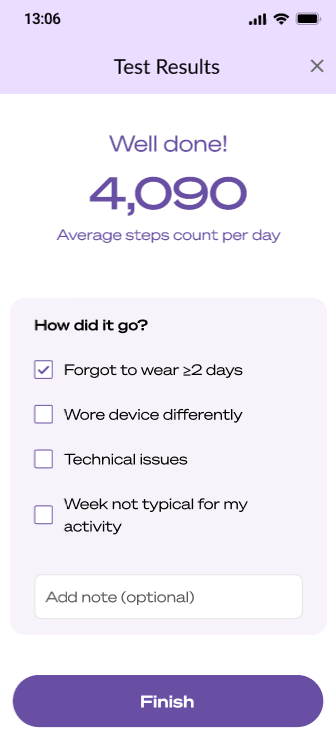
They can track their progress during the experiment and view step data from previous days (see Video See Previous Days). Once the experiment is complete, the final average result is displayed, automatically calculated based on a minimum of 3 valid wear days (see Final Result figure).
🚀Annotations
Annotations are fine-grained labels on signals and events. They are now available as a powerful new feature for research and AI development, allowing Members to add contextual information to specific time periods or data points, supporting long-term interpretation of participant data.
Members can add multiple annotations, view them in a clear list, and edit or delete them whenever needed (see Annotations video). All annotation information is stored safely in the database, ensuring data accuracy and reliability.
🚀Device Monitoring Graphs
A new feature that allows Members to monitor devices for operational sanity checks on connectivity, data continuity, and technical plausibility.
Bellow, the Video 5 provides a brief demonstration of the graphs, showing how units of measurement, colors, and labels are displayed. It also illustrates how hovering over data points reveals precise timestamps and values, and how selecting a time range dynamically updates the displayed data.
🚀SSO Authentication
SSO login for enterprise users, allowing Members to access the Krane Portal using their organization’s Identity provider (IdP). No separate password is needed, making login faster, simpler, and more secure.
Active sessions are retained, so Members stay signed in until their session naturally expires.
🚀Conditional Scheduling
We added a very powerful feature: conditional scheduling. Automation that adapts to real-world signals. Instead of running workflows on a rigid calendar, you can define conditions and let the system schedule the right action at the right moment, only when it’s needed.
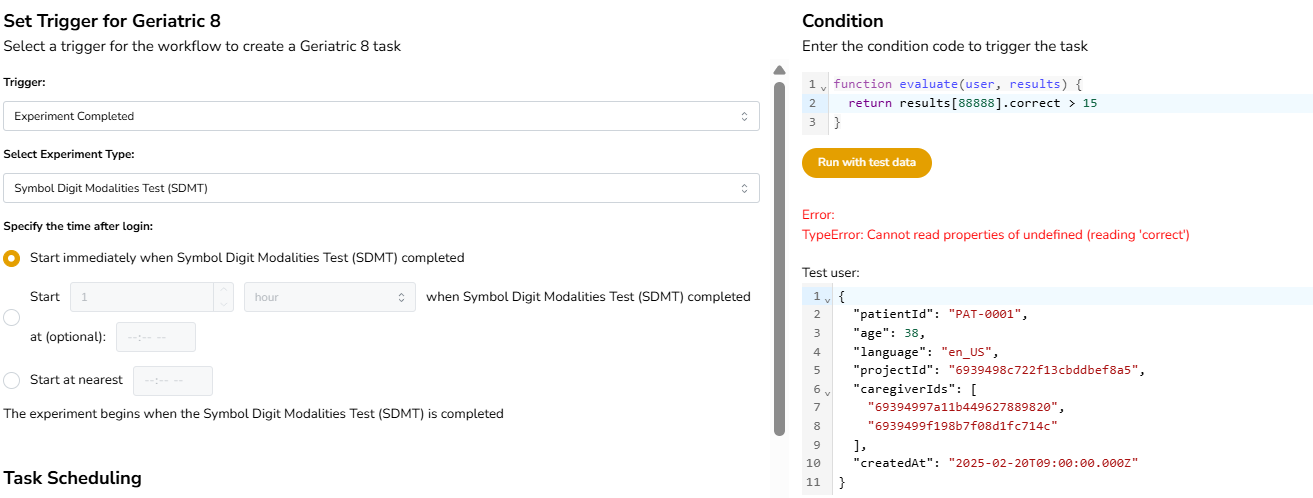
If an invalid script is entered, the Portal will return an error to prevent the workflow from being saved or executed (see Figure bellow).
🐛Bug fixes
We’ve fixed several issues too! For example, the user is now correctly redirected to the Privacy Policy page when accessing from Settings.
App Store / Google Play:
EN:
Orion App:
-
Step Count Experiment
-
Conditional Scheduling
-
Bug Fixes
Orikami App:
-
Step Count Experiment
-
Conditional Scheduling
-
Bug Fixes
TNO App:
-
Step Count Experiment
-
Conditional Scheduling
-
Bug Fixes
NL:
Orion App:
-
Stappen Tellen Experiment
-
Voorwaardelijke Planning
-
Foutoplossingen
Orikami App:
-
Stappen Tellen Experiment
-
Voorwaardelijke Planning
-
Foutoplossingen
TNO App:
-
Stappen Tellen Experiment
-
Voorwaardelijke Planning
-
Foutoplossingen