1. Introduction
1.1 Purpose
The purpose of this manual is to explain the operation of the Push Notifications, Reminders, and Emails system used to engage users and prompt them to complete their scheduled tasks.
1.2 Scope
This manual explains the behavior of notifications, the configuration of both push notifications and reminders (via push and email), and the content displayed within each message type in relation to scheduled tasks.
2. Notifications and Reminders
2.1 Push Notifications
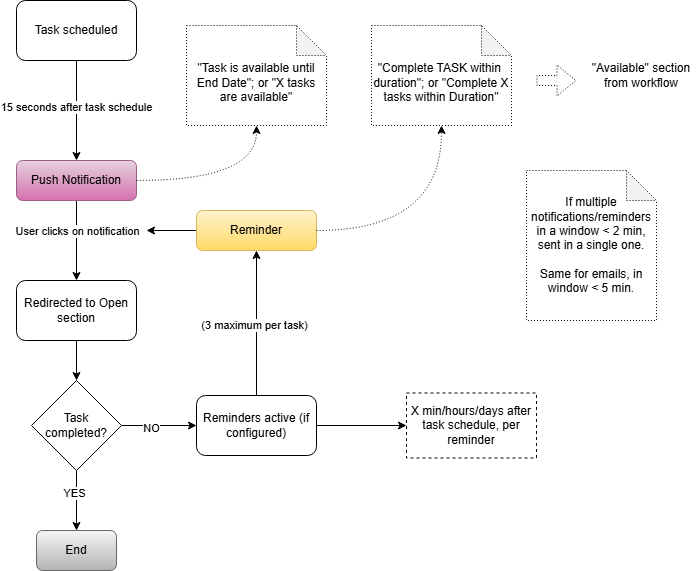
Push notifications are sent to users shortly after a task is scheduled. These notifications aim to alert the user that a new task is available.
-
Trigger timing: 15 seconds after the task is scheduled.
-
Platforms supported: iOS and Android.
-
Notification message:
“Er wacht een nieuwe taak op je.”
(EN: “A task is waiting for you.”) -
Behavior upon click: Redirects the user to the Open screen.
-
One notification per task: Only one notification is sent per scheduled task.
-
Bundling logic:
-
If multiple notifications are scheduled within 5 minutes, they are combined into a single notification.
-
-
Login status:
-
No notifications are sent while the user is logged out.
-
Once the user logs in again, notifications will be sent according to the schedule.
-
2.2 Reminders
Reminders are additional messages configured to prompt users when a task remains incomplete after a set period.
-
Scheduling: Configured in the dashboard according to the workflow (e.g., X minutes/hours/days after task is scheduled).
-
Reminder types: Push notifications and/or emails.
-
Maximum number of reminders: Up to 3 reminders per task.
-
Task completion check:
-
If task is not completed → send a reminder.
-
If task is completed → do not send a reminder.
-
-
Bundling logic:
-
When multiple reminders are scheduled within 5 minutes, they are merged into a single notification (for both push and email).
-
-
Platforms supported: iOS and Android.
-
Reminder message:
“Herinnering: Er wacht nog een taak op je.”
“Voltooi de taak binnen X minuten / uren / dagen.”
(EN: “Reminder: A task is waiting for you.” / “Complete the task within X minutes / hours / days.”)-
The language shown depends on the app’s language settings.
-
2.3 Emails
Email reminders are sent based on the configured reminder schedule and reflect the number of tasks pending.
-
Email subject options:
-
“[App_name] reminder: There are still tasks open”
-
“[App_name] reminder: There is still one task open”
-
2.4 End-Date and Duration Logic
Notification and reminder messages will adapt based on task availability settings in the workflow.
-
Push Notifications:
-
Single task: “Task is available until End Date.”
-
Multiple tasks: “X tasks are available.”
-
-
Reminders:
-
Single task: “Complete Task within Duration.”
-
(e.g., “5 weeks”)
-
-
Multiple tasks: “Complete X tasks within Duration.”
-
Bellow, a workflow diagram: