

1. Introduction
1.1 Purpose
📋 This Instruction for Use describes the functionality and configuration of the Step Count Experiment. This experiment collects step data from one or more data sources available on the participant’s device, depending on the setup defined in the project.
The experiment supports multiple providers (Phone, Garmin, and BYOD) and allows Members to specify which data sources are optional and which are required for participants to complete the experiment.
1.2 Scope
📚 The Step Count experiment can be added to new and existing projects and allows configuration of:
-
Number of days
-
Data sources
Supported data sources include:
-
Phone → Apple HealthKit & Android Recording API/Android Health Connect
-
Garmin → Garmin SDK
-
BYOD → Android Health Connect & Apple HealthKit
1.3 Definitions
Step Count Experiment:
An experiment that collects and stores steps from participants over a configured number of days.
Allowed data source:
✅ An optional data source. Participants may use it if available on their device.
Required data source:
❗ A mandatory data source. Participants must enable it to complete the experiment.
2. Functional Overview
The Step Count Experiment allows collection of steps from multiple configurable sources. Members can:
-
➕ Add the experiment to any project
-
📝 Select one or multiple data sources
-
✅❗ Mark each data source as Allowed or Required
-
⏱ Configure the duration of the experiment
-
📅 Schedule it like any other experiment
3. Procedure Description
Step 1 – Add Step Count Experiment to a Project
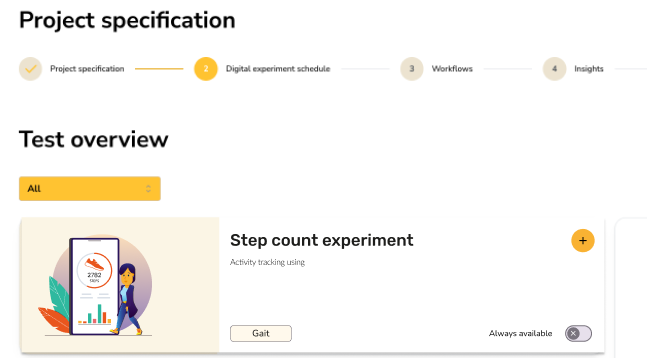
👤 A Member can add the Step Count experiment to new or existing projects.
From the project configuration (see Figure 1):
-
➕ Select Add Experiment
-
📊 Choose Step Count Experiment
Step 2 – Configure Experiment
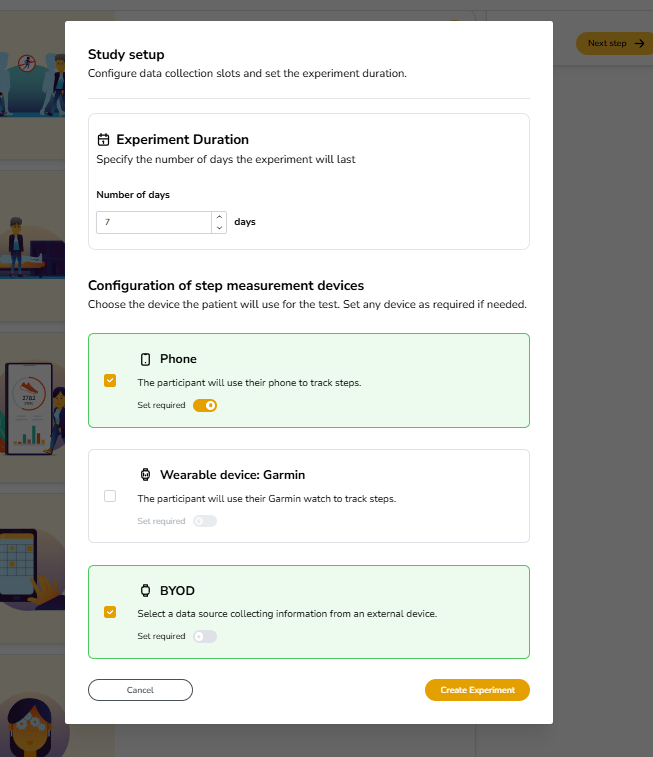
⚙️ The Member configures the experiment (see Figure 2) as follows:
1. Number of Days
📆 Defines the total duration of the step tracking period.
2. Data Sources
📋 The system allows selecting multiple sources:
-
Phone
-
Garmin
-
BYOD
Each source can be set as:
-
✅ Allowed (Optional) → The participant may use it
-
❗ Required → The participant must use it
⚠️ To meet minimum configuration requirements, at least one source must be marked as Allowed or Required.
Step 3 – Schedule the Experiment
📅 The Step Count experiment can be scheduled like any other experiment.
⏳ However, if the schedule is updated after some participants have already started, the experiments already in progress will not be affected.
Step 4 – Data Collection and Completion
🟢 During the configured period:
-
📈 The app continuously retrieves step data from the selected sources
-
🔄 Data is automatically synchronized
✅ When the defined number of days is completed:
-
No additional data can be collected
-
The experiment is marked as Completed